Slope: Building a Privacy-First Weight Coach with Context-Aware AI and Managed Services
A deep dive into building Slope - a weight management app that keeps your data private, uses structured context injection for personalized AI coaching, and scales cost-effectively with managed services.

I've spent years building software for other people's problems. Slope is different - it's the first product I've built that I genuinely benefit from myself. The problem was personal: every weight management app I tried wanted to send my identifying data to OpenAI's servers, prescribe restrictive diets I didn't believe in, or worse - try to sell me Ozempic. I needed something simpler, smarter, and fundamentally more private. So I built it.
The core insight behind Slope is that effective weight coaching isn't about rigid meal plans or obsessive calorie counting - it's about consistent reflection, pattern recognition, and personalized guidance. I'd recently invented my own approach: front-loading calories at breakfast and lunch, keeping dinner light but protein-rich (hard-boiled eggs and cottage cheese became staples), all while maintaining a consistent workout routine. I wanted an AI coach that would help me stick to my plan, not impose someone else's. Slope does exactly that by injecting your personal context - your diet philosophy, schedule, restrictions - into every AI interaction. The user defines the path; the AI helps you walk it.
But Slope isn't just about solving a personal problem. It's also my sandbox for exploring modern web architecture, AI integration patterns, and the economics of managed services. Let's dig into the technical choices that make Slope work.
The Real Intelligence: Structured Context Assembly
The real magic of Slope lives in how it constructs AI prompts. This isn't RAG — there's no vector database, no embedding search, no semantic retrieval step. Instead, every prompt is deterministically assembled from your actual structured data. The model isn't retrieving relevant documents; it's reasoning directly from your personal history, your stated diet philosophy, and your recent numbers. The intelligence comes from what you've told it, not from what it guesses.
Here's how the system structures context for different types of insights:
Weekly Reflection Prompts
For weekly insights, the prompt includes:
- Personal Context - User-authored, persistent description of their diet, schedule, and restrictions
- Recent History - Last 5 weeks of summaries and goals to identify patterns
- Weight Data - Current weight, change vs prior week, overall trend
- Calorie Items - Detailed breakdown of the last 7 days of food logging (if used)
- User Reflection - Their own thoughts on how the week went
This is the critical difference from generic AI chatbots. The model isn't guessing or hallucinating - it's analyzing your data with your context. There's no fuzzy retrieval happening here; the relevant data is always included, deterministically. Here's a simplified version of how prompts are structured:
function buildWeeklyPrompt(ctx: {
  personalContext: string;
  weekKey: string;
  latestWeight: number;
  prevWeight: number | null;
  reflection: string;
  goalsLastWeek?: string;
  trendSnippet: string;
  recentHistory?: Array<{
    weekKey: string;
    summary?: string;
    goals?: string;
  }>;
  calorieItems?: Array<{
    date: Date;
    description: string;
    calories: number;
  }>;
}) {
  // Build comprehensive context string with all relevant data
  const delta = ctx.prevWeight
    ? `${(ctx.latestWeight - ctx.prevWeight).toFixed(1)} lb`
    : 'n/a';

  let historySection = '';
  if (ctx.recentHistory?.length > 0) {
    historySection = '\nRecent Weekly History:\n';
    for (const h of ctx.recentHistory) {
      historySection += `\n--- ${h.weekKey} ---\n`;
      if (h.summary) historySection += `Summary: ${h.summary}\n`;
      if (h.goals) historySection += `Goals: ${h.goals}\n`;
    }
  }

  let calorieSection = '';
  if (ctx.calorieItems?.length > 0) {
    calorieSection = '\n\nCalorie Tracking (Last 7 days):\n';
    // Group by date and show detailed breakdown
    // ...
  }

  return `
Personal Context (user-authored, persistent):
"${ctx.personalContext}"
${historySection}
User Data:
- Week: ${ctx.weekKey}
- Latest weight: ${ctx.latestWeight} lb
- Change vs prior week: ${delta}
- Trend: ${ctx.trendSnippet}
- Last week's goals: ${ctx.goalsLastWeek ?? 'None'}
${calorieSection}
Reflection:
"""
${ctx.reflection}
"""

Constraints:
- Use Reflection, Personal Context, and User Data as guide
- Reference patterns from recent history if relevant
- Incorporate calorie insights if available
- Keep total under ~170 words
- CRITICAL: Complete all sentences with proper punctuation
`;
}
Cumulative Journey Summaries
For longer-term insights (sent via email on Sundays), the system constructs even richer context:
- Full Journey Statistics - Starting weight, current weight, total change, number of entries
- Last 10 Weeks of Summaries - Complete history including user reflections, AI summaries, and goals
- 30-Day Calorie Trends - Aggregated daily totals and patterns
- Activity Status - Days since last entry to detect disengagement
- Current Goal - Target weight and timeline
These cumulative summaries run as background jobs (more on that later) and provide encouragement, pattern recognition across months of data, and strategic insights that weekly reflections can't capture.
Architecture: Managed Services Over Kubernetes
One of the most liberating decisions I made was to embrace managed services instead of building everything myself. I've spent enough years drowning in Kubernetes YAML, debugging Docker networking, and paying cloud bills that scaled faster than usage. For a side project that needs to stay lean until it proves itself, managed services are a no-brainer.
Here's the full system design:
Why This Stack?
Vercel for Next.js hosting - This one's obvious. Vercel's DX for Next.js deployment is unmatched. Push to GitHub, get instant previews, automatic edge caching, and built-in analytics. The free tier is generous enough for early-stage products, and scaling happens transparently. Server components in Next.js 15 mean less JavaScript shipped to clients, and the App Router makes data fetching patterns cleaner than ever.
Neon for PostgreSQL - Serverless Postgres that scales to zero when you're not using it. In the early days, my database sits idle most of the time. Why pay for 24/7 uptime? Neon only charges for actual storage and compute seconds used. The connection pooling is built-in, and the developer experience rivals Supabase but with better cold start times. As usage grows, I can enable read replicas and adjust compute limits without touching infrastructure code.
Upstash for Redis - Similar story: serverless Redis that bills per request. Perfect for BullMQ queues and session caching. No need to manage Redis instances, worry about memory limits, or configure replication. Just connect and go. The pricing model means I pay pennies during development and only scale costs when users actually show up.
Render for the queue worker - This was the wildcard choice. I needed somewhere to run my BullMQ worker that processes background jobs (cumulative summaries, batch operations). Render's free tier for background workers is incredibly generous - you get 750 hours per month, which is enough to run a single worker 24/7. When I need horizontal scaling, I can add more workers without touching deployment scripts. No Kubernetes manifests, no Docker registry management, just deploy from GitHub and forget about it.
The economics are compelling. During development and early launch, my monthly infrastructure costs hover around:
- Vercel: $0 (Hobby plan)
- Neon: ~$5 (storage only)
- Upstash: ~$3 (request-based)
- Render: $0 (free tier)
- Total: ~$8/month
Compare this to running your own Kubernetes cluster with load balancers, managed Redis, and RDS PostgreSQL - you'd be looking at $200-500/month minimum, plus countless hours of DevOps overhead. The managed services approach lets me focus on shipping features, not babysitting infrastructure.
The Queue System: BullMQ in Production
One pattern I'm particularly proud of is the message queue architecture. Certain operations - like generating comprehensive journey summaries or batch processing users - can take 10-30 seconds and involve multiple LLM calls. You can't make users wait for that in an HTTP request.
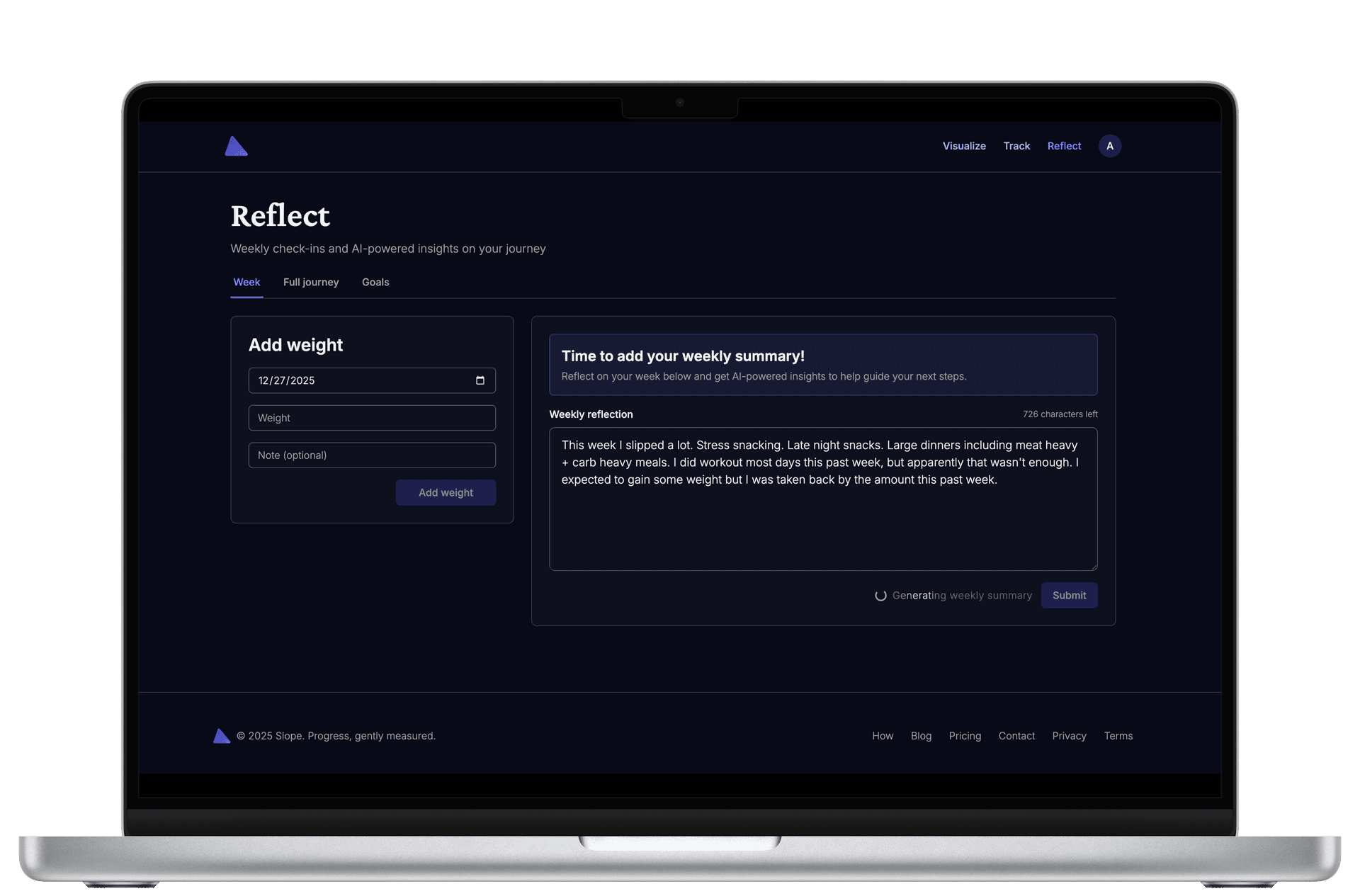
Enter BullMQ, a robust job queue built on Redis. The Next.js API enqueues jobs, and the Render worker processes them asynchronously:
// Enqueuing a job from Next.js API route
import { enqueueJob } from '@hensonism/slope-queue';

export async function POST(req: Request) {
  const { userId } = await req.json();

  // Enqueue the job - returns immediately
  await enqueueJob({
    type: 'cumulative-summary',
    data: { userId },
  });

  return Response.json({ status: 'queued' });
}
The worker on Render continuously polls Redis for new jobs:
// Worker setup (simplified)
import { Worker } from 'bullmq';
import Redis from 'ioredis';

const connection = new Redis(process.env.REDIS_URL, {
  maxRetriesPerRequest: null, // Critical for BullMQ
  enableReadyCheck: false,
});

const worker = new Worker(
  'slope-queue',
  async (job) => {
    const processor = processors.find(p => p.jobType === job.name);
    await processor.process(job);
  },
  {
    connection,
    concurrency: 5, // Process 5 jobs simultaneously
  }
);
Jobs are fault-tolerant with automatic retries, and the system gracefully handles failures without losing work. This architecture cleanly separates user-facing responsiveness from computationally expensive background operations.
The Frontend: Next.js 15, React 19, and Modern UI
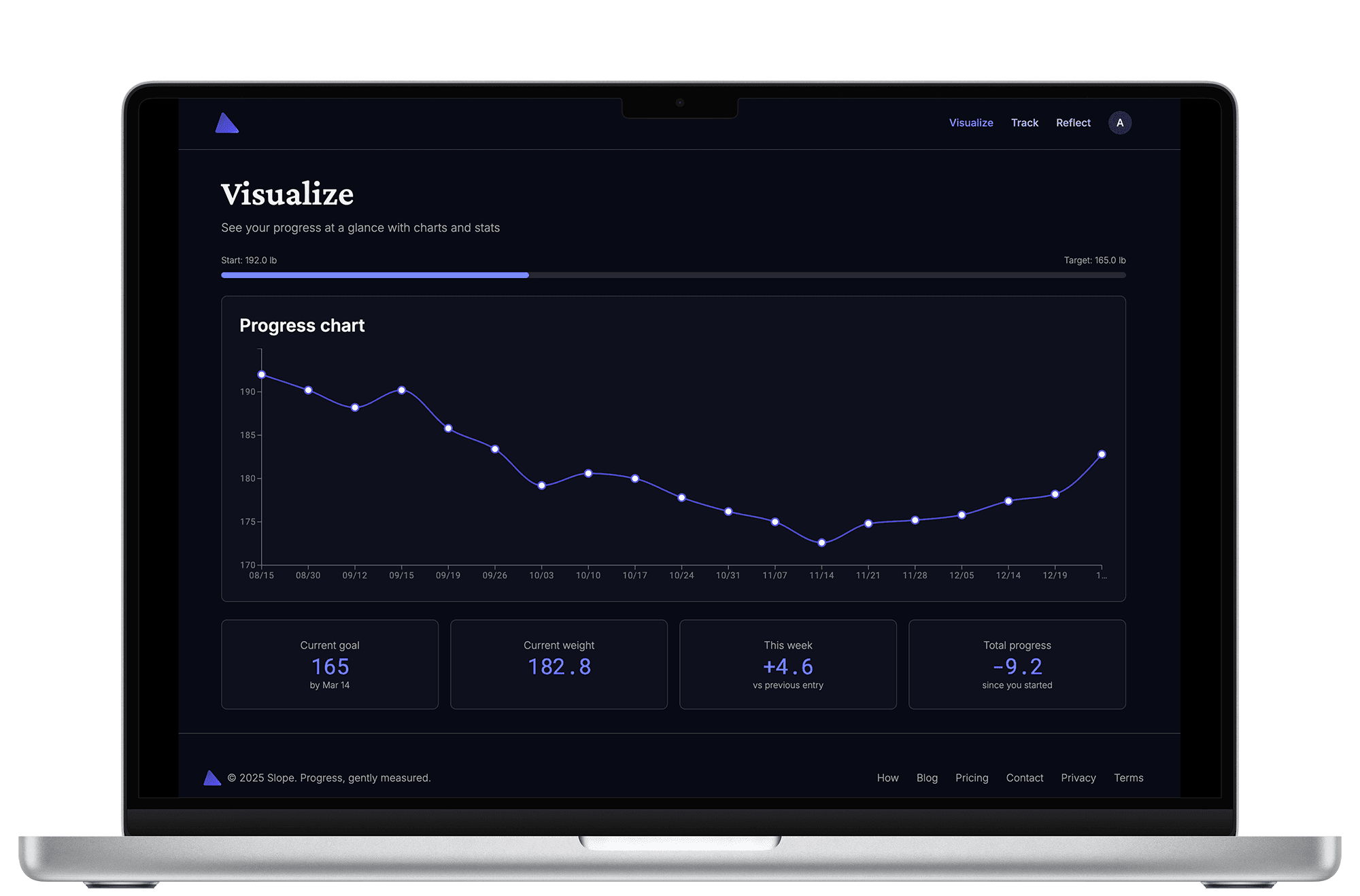
The frontend embraces the latest React paradigms. Next.js 15's server components mean the initial page load includes fully rendered HTML - no loading spinners for core content. Client components are used strategically for interactivity:
- Dashboard charts - Using
@mui/x-chartsLineChart for weight visualization - Forms - Leveraging React 19's new form hooks for simpler state management
- Animations - Framer Motion for smooth parallax effects and transitions
- Styling - Tailwind CSS with a custom design system built on Radix UI primitives
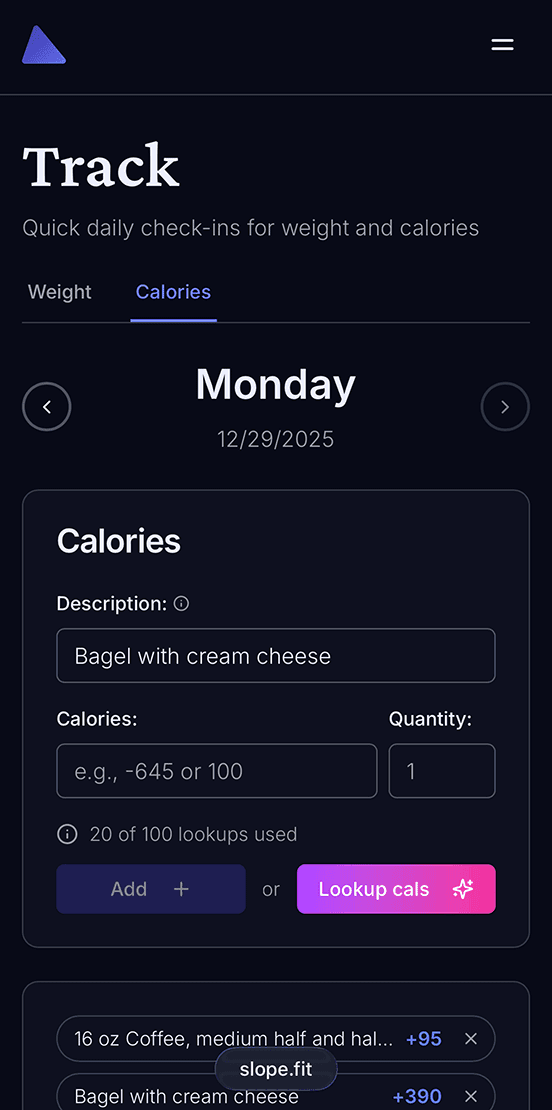
The calorie tracking feature demonstrates this philosophy perfectly. It's completely optional - users can engage as much or as little as they want. The interface is built with Radix UI's unstyled primitives, styled with Tailwind, and animated with Framer Motion. The whole experience feels native, fast, and delightful.
Instrumentation: Observability Without Overhead
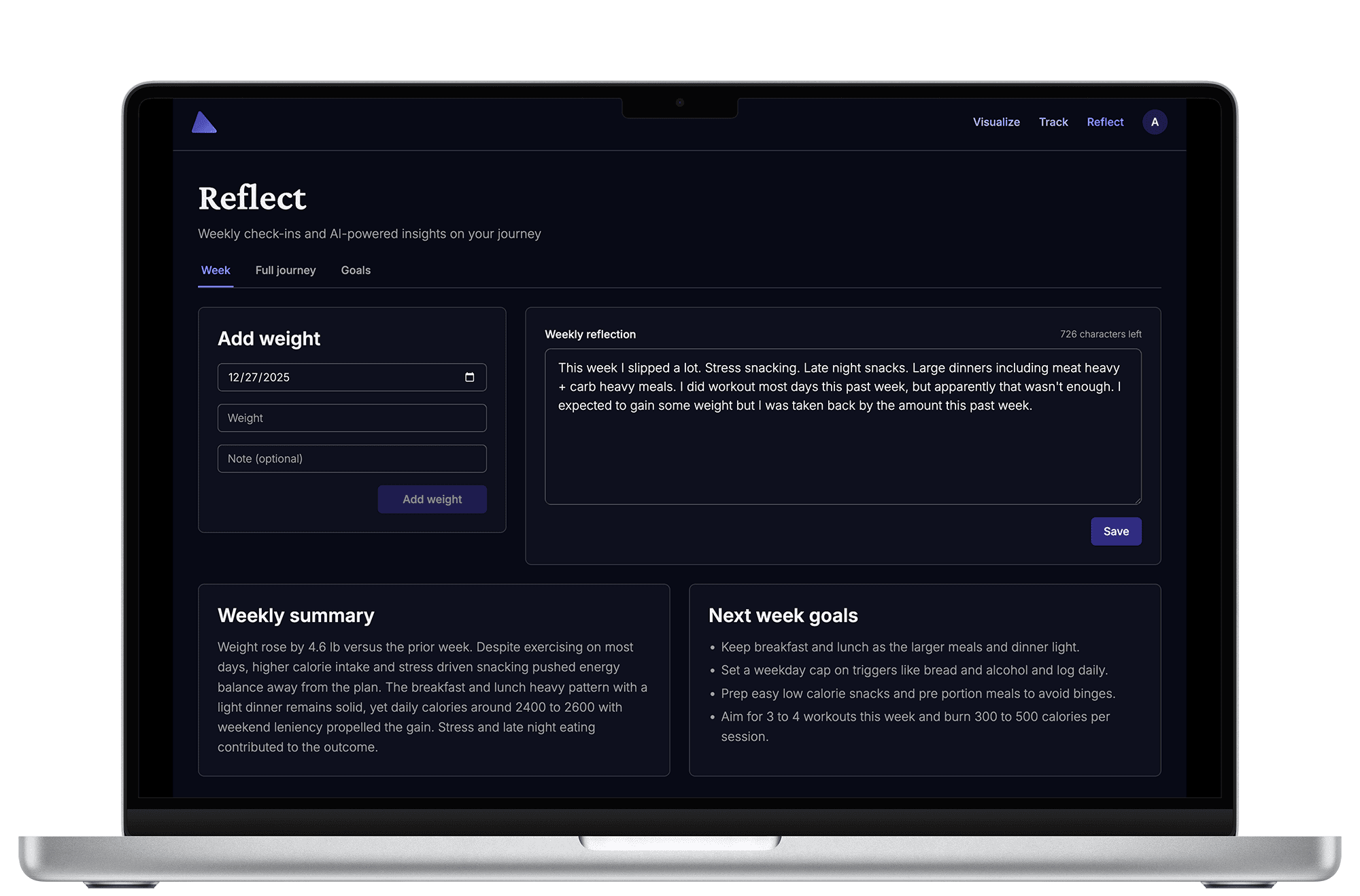
You can't improve what you can't measure, but you also can't afford enterprise-grade observability tools when you're bootstrapping. I settled on two key services:
PostHog for product analytics - Self-hostable (though I use their cloud), privacy-focused, and incredibly powerful. I track user flows, feature adoption, and conversion funnels. The session replay feature is invaluable for debugging UX issues. Best of all, it integrates cleanly with Next.js middleware and doesn't bloat client bundles.
Helicone for LLM observability - This one's brilliant. Instead of calling Anthropic/OpenAI directly, you route requests through Helicone's proxy. They log every prompt, response, token count, and cost - all without touching your code logic. It's a single environment variable change:
const anthropic = new Anthropic({
  apiKey: process.env.ANTHROPIC_API_KEY,
  baseURL: 'https://anthropic.helicone.ai/',
  defaultHeaders: {
    'Helicone-Auth': `Bearer ${process.env.HELICONE_API_KEY}`,
  },
});
Now I can see exactly which prompts are expensive, which responses are slow, and whether my context assembly is bloating unnecessarily. This visibility is critical when LLM costs can spiral if you're not careful.
What's Next
Slope is live at slope.fit and actively being used (by me, for starters). The architecture proved itself immediately - I can ship features fast, costs stay low, and the system handles spikes gracefully. The context-aware prompting approach delivers genuinely helpful insights because it's grounded in real data, not generic advice.
The bigger lesson here is about architectural pragmatism. Modern managed services have reached a point where building your own infrastructure is often a form of procrastination disguised as engineering. Sometimes the best technical decision is to use someone else's servers and focus on the problem only you can solve.
For Slope, that problem is simple: help people manage their weight with AI coaching that respects their privacy, understands their personal context, and adapts to their unique approach. Everything else is just plumbing - and plumbing is what managed services do best.
Sources & Further Reading
- Slope - The app itself
- Vercel Next.js 15 Docs - Server Components and App Router
- BullMQ Documentation - Redis-based job queue
- Helicone - LLM observability
- Neon Serverless Postgres - Serverless database